

CS Menu Conditions is a paid Joomla 5 / 6 plugin that hides one menu item on the pages you choose. Joomla decides where a whole menu module shows, but not where a single item inside it shows. This plugin adds a Conditions tab to every menu item, and on the pages that match, the item is taken out of the page before it is sent, along with anything inside it.
Why this exists
Sometimes one menu item carries more than a link: a hover subscribe form, a button that opens a pop-up, a widget that clashes with another copy of itself on the same page (two Turnstile or reCAPTCHA boxes, for example). Hiding it with CSS still loads its scripts. Making a second menu module for those pages means keeping two menus in step. CS Menu Conditions removes just that item, just on those pages, and the rest of the menu stays as it is.
How it works
| Step | What happens |
|---|---|
| You set the conditions | Open a menu item and use its Conditions tab: switch conditions on, then pick the pages where the item should disappear. Every choice is a list to pick from; you never type item numbers or component names. |
| Joomla builds the page | Nothing changes in your template or menu module. The page is put together as usual. |
| The item is taken out | Just before the page is sent, the plugin removes that item's entry from the menu. Its link, its dropdown and any scripts inside it never reach the visitor's browser, so nothing tries to start up. |
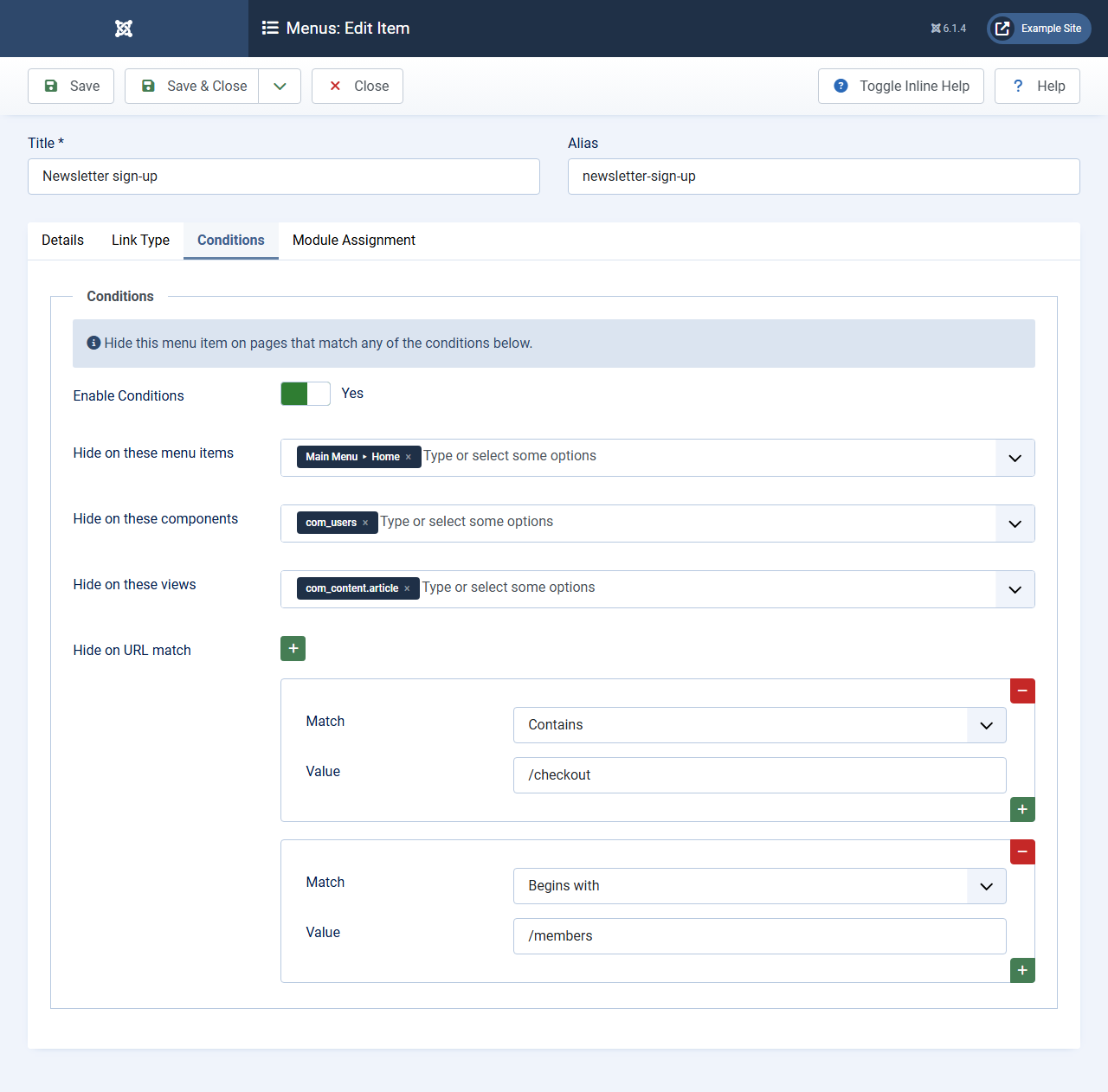
What it can do
| Feature | What you get |
|---|---|
| Hide on these menu items | Pick the pages (by their menu items, grouped by menu) where this item should be hidden. |
| Hide on these components | Pick installed components, and every page from them hides the item. |
| Hide on these views | Pick a component's views, such as a single article or a category list. |
| Hide on URL match | Rules such as "contains", "equals", "begins with", "ends with" or a regular expression. Paths, part of a path or a full address all work. |
| Whole item or dropdown only | Hide the item and everything under it, or keep the link and hide only its dropdown. |
| Debug comment | An optional note in the page source lists which items were hidden, so you can check a rule. |
| Languages | 17 languages: English, Czech, Dutch, French, German, Greek, Italian, Japanese, both Norwegian written forms, Polish, Brazilian Portuguese, Russian, Simplified Chinese, Spanish, Swedish and Turkish. |
Any condition that matches hides the item. The menu item picker works on every site. The component, view and URL conditions open once the site is linked to your cybersalt.com account.
Installing it
You'll need Joomla 5 or 6 and PHP 8.1 or later.
- Purchase access with the button above, then log in and download the ZIP. One purchase covers as many of your sites as you like.
- In Joomla admin, go to System → Install → Extensions and upload the ZIP. The plugin is switched on for you.
- Go to System → Manage → Plugins, open System - CS Menu Conditions, and on its Link your account tab enter the email address of your cybersalt.com account and press Link account. That opens the component, view and URL conditions, and new versions then arrive through Joomla's own System → Update → Extensions screen.
- Edit a menu item and open its new Conditions tab.
If your licence lapses
Conditions you have already saved keep working. If the licence expires, you unlink the site or cybersalt.com can't be reached, your menu items go on hiding exactly what they hid; you just can't change those conditions until a licence is active again. Your visitors never see a difference, and the front end of your site never contacts cybersalt.com.
Open source
CS Menu Conditions is licensed under GPL-2.0-or-later, the same license as Joomla itself. The full source is in the ZIP you download.





Add comment