

0-9 and A-Z Menu is a paid Joomla 5 / 6 extension that puts a row of A to Z and 0-9 buttons above your category pages. Click B and the page lists only the articles whose title starts with B. The filter is added to Joomla's own article query rather than hiding articles after the page is built, so pagination, ordering, access levels and your template's layout all keep working the way they did before. That includes layout engines like EasyLayouts.
Why this exists
Joomla's category pages have no way to browse by letter. If you run a directory-style section, such as artists, schools, a glossary or a collection of jokes, your visitors page through the list twenty items at a time to find the one they want. The usual workarounds are a category per letter, a full directory component, or a module that hides articles as the page renders. That last one is the common trap, because the pagination still counts every article, so page 3 of 12 can come up nearly empty. This extension adds one condition to the query Joomla already runs, so the page count and the ordering still come from Joomla core and both reflect the filtered list.
What's in the package
One ZIP installs two extensions that work as a pair.
| Element | Type | Job |
|---|---|---|
mod_cs09azmenu |
Site module | Draws the button bar and holds all of the display and styling settings. |
plg_system_cs-09azmenu |
System plugin | Does the filtering. When a category page is requested with a letter, it narrows Joomla's article query to titles starting with that letter. |
What it can do
| Feature | What you get |
|---|---|
| Letter and number buttons | A to Z buttons, plus either one combined 0-9 button or ten separate 0 to 9 buttons. Either set can be switched off, and the bar can run Z to A instead. |
| Where it shows | Only on article category listings, whatever the module's menu assignment says, so it's safe to assign to every page. Limit to Categories narrows it to the categories you pick from a normal category picker. |
| Child categories | Show in Child Categories decides what happens underneath the categories you picked: No keeps the bar on those categories only, Yes shows it on their subcategories instead, and Both shows it on all of them at any depth. |
| Filtering | Matches the first character of the article title, upper or lower case. The current letter stays in place on page 2 and beyond, and its button is highlighted so visitors can see which filter is on. |
| Button styling | Background, text and border colours for the normal, hover and active states, plus font size, weight and text case, border width and radius, padding, minimum width, spacing and alignment. |
| Colour picker | A modern picker with an opacity slider. Its quick-pick swatches are taken from your default template's own colours, so matching your site's palette is one click. |
| Custom CSS | A Custom CSS field on each module for anything the settings don't cover. |
| Languages | 17 languages: English, Dutch, German, Spanish, French, Italian, Brazilian Portuguese, Russian, Polish, Japanese, Simplified Chinese, Turkish, Greek, Czech, Swedish and both Norwegian written forms. |
Installing it
You'll need Joomla 5 or 6 and PHP 8.1 or later. The installer checks both and stops with a clear message if either is too old.
- Purchase access with the button above, then log in and download the ZIP.
- In Joomla admin, go to System → Install → Extensions and upload the ZIP. The module and the plugin install together.
- A fresh install switches on the filter plugin, System - Cybersalt 0-9 and A-Z Menu Filter, for you, and the install screen shows what to do next.
- To receive updates, open that plugin's Pro Activation tab, enter the email of your cybersalt.com account and save.
Using it
- Go to Content → Site Modules, click New and choose Cybersalt 0-9 and A-Z Menu. Publish it in a module position above your article list.
- If the bar belongs on only some category pages, pick them in Limit to Categories and set Show in Child Categories. The field's help text walks through each choice with an example.
- Open the Button Styles tab and set the colours. Click any colour field and the swatches along the bottom of the picker are your template's colours.
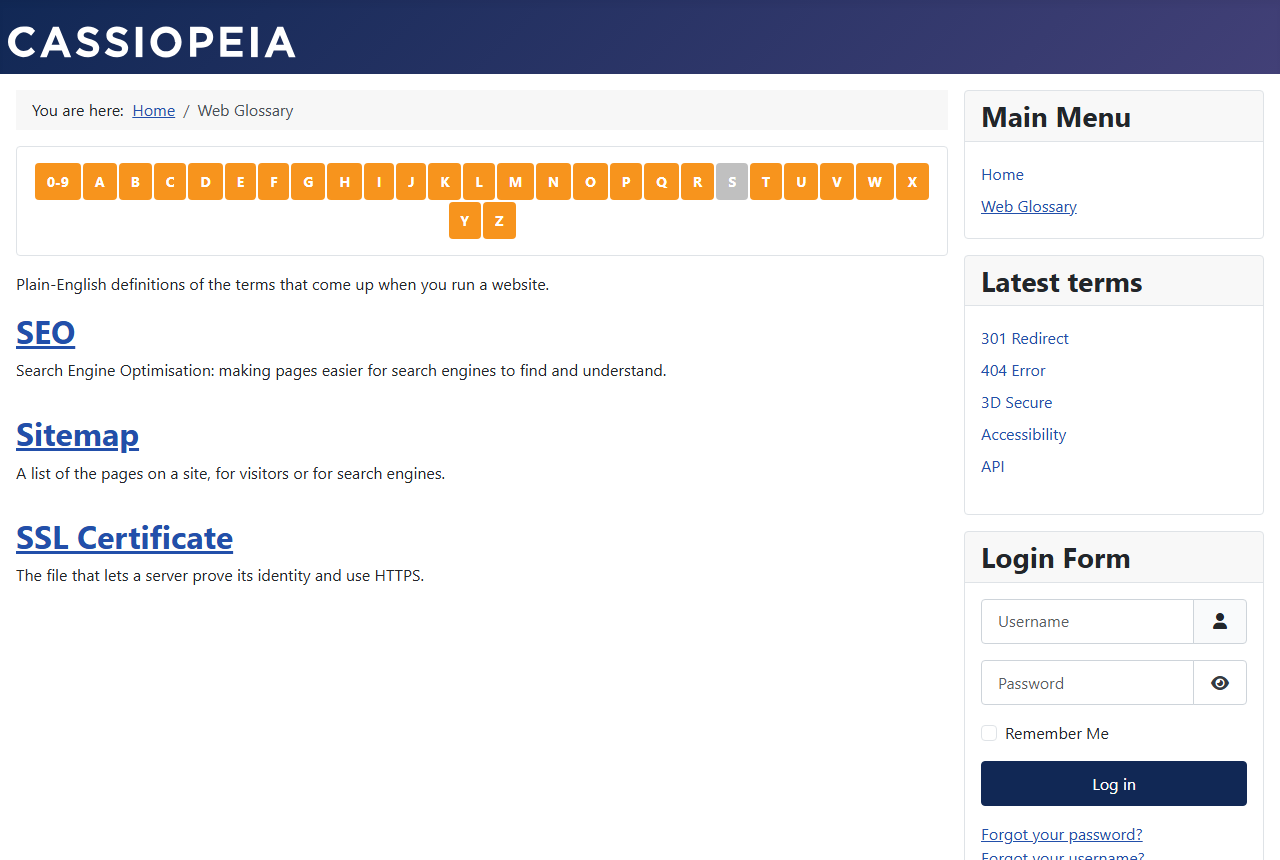
The buttons link to the same category page with ?letter=B added. If letter clashes with something else on your site, you can rename the parameter in the plugin's settings, and the module picks up the change automatically. The Z to A setting only reverses the buttons. Article ordering within a letter still comes from the menu item, the same as it does without the filter.
One limitation to know about: titles that start with punctuation or a non-Latin character don't match any button, so they can't be reached from the bar.
Permissions and security
The filter can only narrow a list. Access levels, published state and publish dates are all still applied by Joomla core, so the bar can never show a visitor an article they couldn't already see. The module is never cached, because its output depends on the page and the letter being viewed, and a cached copy would show the wrong active button on other pages.
Open source
0-9 and A-Z Menu is licensed under GPL-2.0-or-later, the same license as Joomla itself. The full source is in the ZIP you download.





Add comment