Articles Module Maxxed is a free Joomla 5 / 6 system plugin that adds a "Skip first N articles" setting to Joomla's core articles modules. Set Skip to 5 and the module shows articles 6 through 10 instead of starting at the most recent. Joomla doesn't have this setting built in, even though there are plenty of times you want it. The most common one is when you've got a list of articles at the top of a page and a module below that needs to pick up where the list left off.
SiteGround Cache is a free Joomla 5/6 system plugin that integrates with SiteGround’s server-side dynamic cache. It auto-purges SiteGround’s cache when your content changes, sets the right HTTP cache headers, and strips Joomla’s session cookie on cacheable anonymous responses so the SiteGround edge can actually cache them. Without that last piece, SiteGround returns SKIP_CACHE_SET_COOKIE on every guest hit and the dynamic cache is effectively a no-op for crawlers and first-time visitors.
Cybersalt Pro extensions distributed via Cybersalt Release Manager (cs-release-manager) are gated by a membership check. When you install a Pro extension and click Activate Pro in its admin dashboard, the extension contacts Cybersalt, verifies your membership, and unlocks the Pro features on your site.
This page explains what each of the four possible outcomes means and what to do next.
MCP for J is a free Joomla 5 / 6 extension that turns your Joomla site into its own MCP server. Connect ChatGPT, Claude, Codex, Cursor, VS Code with GitHub Copilot, Gemini CLI or any other MCP app, and it can manage your site directly: articles, menus, modules, users, custom fields, templates, extensions, Schema.org and more. It acts with exactly the permissions of the Joomla account it's working for. There's nothing to install on your computer and no service in between. Optional add-ons extend it to 31 popular third-party extensions.
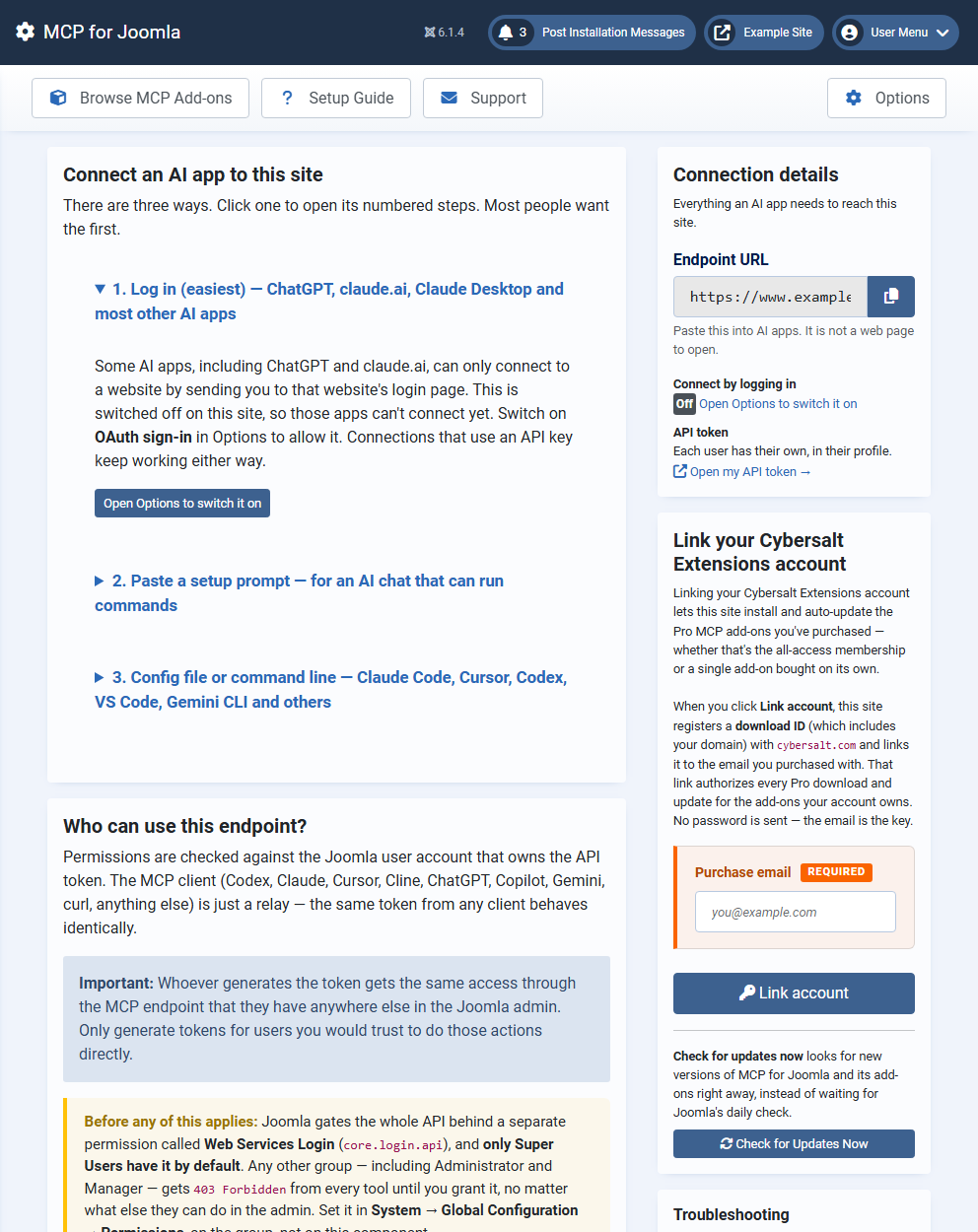
The Dashboard: three ways to connect an AI app, and the address to give it.
Why this exists
Most ways of connecting an AI to Joomla run a script on each person's computer: ten sites, ten scripts to keep running. MCP for J makes the site itself the server. Install it once, and any AI app anywhere connects with the site's address and a login.
What's in the package
One package installs four parts, all enabled automatically:
Part
What it does
Component
The MCP server, its permission checks, sign-in, the activity log, and the admin screens (Dashboard, Browse MCP Add-ons, Setup Guide, Logs, Support).
Web Services plugin
Creates the endpoint address, /api/index.php/v1/mcp.
System plugin
The 93 built-in tools.
OAuth authentication plugin
Lets AI apps that connected by logging in use the site.
What the AI can do
93 built-in tools in 15 groups: articles, categories, tags, menus, modules, custom fields, users and API tokens, permissions, extensions and plugins, templates, languages, Schema.org / SEO, system tasks, Joomla update, and admin-menu presets. Every tool describes itself to the AI app, so there's nothing to configure.
Installing it
Download the latest release zip from the link near the top of this page.
In Joomla admin, go to System → Install → Extensions and upload the zip.
Open Components → MCP for J to see the Dashboard.
Connecting
Three ways, from the Dashboard:
Log in. Switch on OAuth sign-in, paste the site's address into the app, log in and click Allow. This is the only way ChatGPT and claude.ai can connect.
Paste a setup prompt into an AI app that can run commands.
Paste a ready-made config into the app's settings.
Step-by-step instructions for each app are in the documentation.
Permissions and security
The AI can never do more than the Joomla account it acts for. Super Users work immediately. Other groups need Joomla's Web Services Login permission, plus MCP for J's own Use and Write permissions, which are set in Options → Permissions. Five tools that can change who has power over the site are Super-User-only:
installing extensions
changing permissions
enabling or disabling extensions
changing plugin settings
applying Joomla updates
Read-only mode limits the endpoint to tools that only read. Deletes go to the trash first. The activity log records every tool call, but never tokens or passwords.
Add-ons
Browse MCP Add-ons installs tools for specific extensions, such as AcyMailing, Akeeba Backup, Community Builder, Convert Forms, DPCalendar, J2Commerce, JCE and VirtueMart. Free add-ons install with one click. Pro add-ons for commercial extensions are available with a Cybersalt membership. The add-ons are built independently; you need the extension itself from its vendor.
Cybersalt Override Checker is a free Joomla 5 and 6 extension that pairs your site with Claude AI to security-review every flagged template override — classifying real risks, ignoring the cosmetic noise, and applying the patches you confirm without leaving the Joomla admin.
Joomla's native Template Manager flags every override whose core ancestor has changed after a Joomla update. It can't tell you whether the change matters — and after every point release, every template with overrides lights up at once. Signal-to-noise is zero exactly when a site owner needs to know whether their site is compromised.
Cybersalt Override Checker is template-literate. It reads Joomla's own override-tracker data, fetches both sides of every flagged override, and asks Claude to tell you what really changed.
How it works
For every override Joomla has flagged, the extension:
Fetches the override file and the stock core file it's shadowing.
Asks Claude to classify the drift as alert (a security regression — missing escape, removed CSRF token), review (legitimate customisation that's drifted), or info (cosmetic — copyright year, whitespace).
Reports back in plain English, written for the site owner — not the developer.
Applies the patches you confirm, in place, with an automatic backup of every changed file. Roll back any patch from the admin if you change your mind.
Marks the rest as checked so the "Changes found" badge clears for everything that has been reviewed.
Two ways to run it
Mode
What you need
How it runs
Manual
No API key — just your Claude subscription.
Copy the scan prompt from the dashboard, paste it into claude.ai or Claude Code, and Claude calls back to your Joomla Web Services API using your Joomla API token. It produces the report, asks what to fix, and applies the fixes through the API.
Automated
An Anthropic API key — pay-per-token, with hard cost caps you set in Options.
Save your key, click Run automated scan, and the server drives the whole review. A chat box on the session detail view lets you tell Claude which findings to fix — Claude applies them server-side, you watch each turn render as a chat bubble. You never leave the Joomla admin.
What you get
A dashboard widget that shows the override-drift count at a glance.
A sessions log with every Claude report saved server-side.
A File Backups view with one-click Restore for every patch ever applied.
An Action Log of every fix, dismissal, and backup purge.
ACL-gated Web Services API for the manual workflow.
Multilingual UI in 15 languages — German, French, Spanish, Italian, Portuguese, Dutch, Russian, Polish, Japanese, Chinese, Turkish, Greek, Czech, and Swedish.
Requirements
Joomla 5.0+ or 6.0+
PHP 8.3+
For the automated workflow only: an Anthropic API key (pay-per-token billed by Anthropic, with hard cost caps you set in the extension's Options).
Open source
Cybersalt Override Checker is open source under GPL-2.0-or-later. Free to use on as many sites as you like. Full source, issue tracker, and release downloads live at github.com/cybersalt/cs-template-integrity.


 Articles Module Maxxed is a free Joomla 5 / 6 system plugin that adds a "Skip first N articles" setting to Joomla's core articles modules. Set Skip to 5 and the module shows articles 6 through 10 instead of starting at the most recent. Joomla doesn't have this setting built in, even though there are plenty of times you want it. The most common one is when you've got a list of articles at the top of a page and a module below that needs to pick up where the list left off.
 SiteGround Cache is a free Joomla 5/6 system plugin that integrates with SiteGround’s server-side dynamic cache. It auto-purges SiteGround’s cache when your content changes, sets the right HTTP cache headers, and strips Joomla’s session cookie on cacheable anonymous responses so the SiteGround edge can actually cache them. Without that last piece, SiteGround returns
 MCP for J is a free Joomla 5 / 6 extension that turns your Joomla site into its own MCP server. Connect ChatGPT, Claude, Codex, Cursor, VS Code with GitHub Copilot, Gemini CLI or any other MCP app, and it can manage your site directly: articles, menus, modules, users, custom fields, templates, extensions, Schema.org and more. It acts with exactly the permissions of the Joomla account it's working for. There's nothing to install on your computer and no service in between. Optional add-ons extend it to 31 popular third-party extensions.
 Cybersalt Override Checker is a free Joomla 5 and 6 extension that pairs your site with Claude AI to security-review every flagged template override — classifying real risks, ignoring the cosmetic noise, and applying the patches you confirm without leaving the Joomla admin.
